
Meta's AI research way of handling ML configurations
Production-ready configuration management for your ML workloads using OmegaConf and Hydra.

The bigger the ML projects get, the harder it gets to keep them organized.
Juggling datasets, architectures, or various sets of hyperparameters, you’ll feel like trying to keep a bunch of hyperactive cats in a basket.
ML is a field with multiple dynamic components. Your model architecture might differ between experiments, the hyperparameters can be changed to aim for better accuracy or datasets can be merged, and curated for further fine-tuning and adapting a model to specific tasks.
Each of these steps involves a specific configuration at each stage and storing these as separate files will become harder to manage.
ℹ️ That’s why for ML, we need proper configuration management.
ML Configuration Management
Configuration management is a key step of effective MLOps, enabling reproducibility and traceability throughout the machine learning lifecycle. As models evolve through multiple iterations, we need to preserve the connections between data, data transformations, model configurations, model versions, and multiple other components to establish a clear lineage.
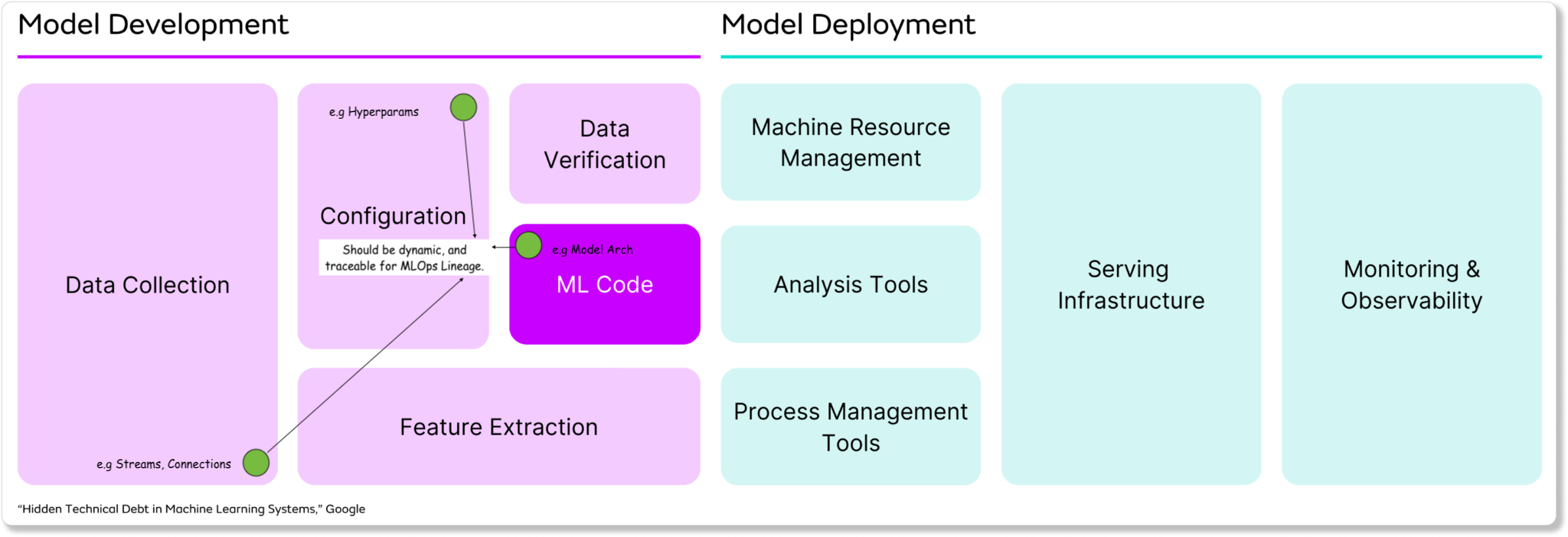
Many AI/ML engineers rely on Pydantic for configuration management due to its familiar syntax and robust validation capabilities. They define Pydantic BaseModels to validate the configuration schema, and then split configuration parameters into many .yaml files - each for their specific BaseModel.
However, Pydantic is standalone and:
Changing a specific field is not possible at runtime.
Merging multiple components configuration relies on a code-first approach.
As the project grows, the number of configuration files grows and it’s harder to keep track of them if they’re all over the place.
That’s where Hydra and OmegaConf come into play, and became an industry standard for dynamic configurations in Python projects, especially in ML.
Table of contents:
What is OmegaConf?
Type checking in OmegaConf configs
What is Hydra?
Leveraging config runtime flexibility with Hydra
Using the main decorator for monolith applications
Using the initialize and compose for more control
Additional Tricks and Practices
1. What is OmegaConf?
OmegaConf is a hierarchical configuration system designed specifically for complex applications like ML pipelines. At its core, OmegaConf is a powerful configuration files management tool for YAML files, offering several key advantages:
Configuration Composition: Merge multiple configuration files, making it easy and modular, which is useful for separating concerns like model architecture, training parameters, and environment settings.
Variable Interpolation: You can reference values defined elsewhere in your configuration using syntax like
${path.to.value}, which enables dynamic configuration without duplication.Type Safety: Configuration schema can be validated against strict Dataclasses and even Pydantic BaseModels.
Structured Access: Once a YAML config is loaded, fields can be accessed via attribute notation `config.model.lr` or dictionary-style `config[“model”][“lr”]`
Let’s see how it works!
First, let’s define a basic file structure for our example, then define 3 configuration files for dataset, model, and evaluation followed by loading them using OmegaConf and accessing fields in a structured manner as specified in step 4.
Basic Project Files Structure
├── my_awesome_llm/
├── conf/
│   ├── dataset.yaml
│   ├── model.yaml
│   └── evaluation.yaml
├── playground.py
YAML configs
# dataset.yaml
dataset:
  name: "custom_dataset_v1.0"
  path: "/datasets/custom/v1.0"
  split: "test"
  preprocessing:
    - "remove_special_characters"
    - "lowercase"
# model.yaml model: name: "meta-llama/Llama-2-7b" type: "transformer" task: "text-generation" temperature: 0.7 max_length: 512 top_p: 0.9 fine_tune: True# evaluation.yaml evaluation: metrics: - "diversity" - "fluency" diversity_measure: "distinct_ngrams" fluency_measure: "perplexity" sample_size: 100Installing OmegaConf
# pip
pip install omegaconf

# uv
uv init && uv venv --python 3.11.6
uv add omegaconf && source .venv/bin/activate
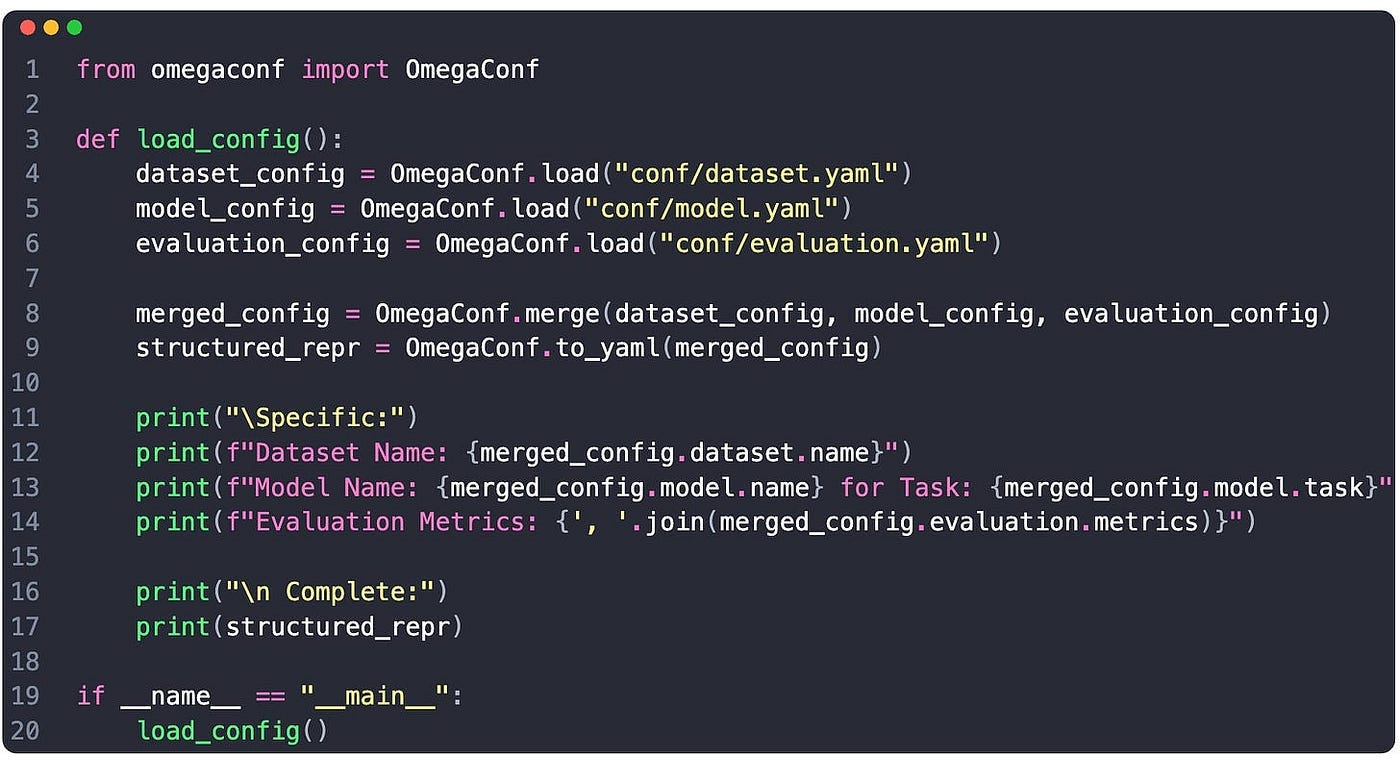
Loading Configurations

We load each config separately
We merge configs into one merged_config
We access any field using Structured Access via object `.` notation.
2. Type checking in OmegaConf configs
OmegaConf supports type-checking and validation through structured configurations, which are Python classes decorated with @dataclass. For more complex field validation workflows, we could use a Pydantic BaseModels workaround and serialize our config into a BaseModel, but for this example let’s pick the default dataclass approach for type-checking.
Enforcing type safety is particularly useful for maintaining the integrity of configurations.
Considering the YAML files from above, here’s the dataclass representation:
from dataclasses import dataclass, field
from typing import List, Union

@dataclass
class PreprocessingConfig:
    steps: List[str] = field(default_factory=list)

@dataclass
class DatasetConfig:
    name: str
    path: str
    split: str
    preprocessing: PreprocessingConfig

@dataclass
class ModelConfig:
    name: str
    type: str
    task: str
    temperature: float
    max_length: int
    top_p: float
    fine_tune: bool

@dataclass
class EvaluationConfig:
    metrics: List[str]
    diversity_measure: str
    fluency_measure: str
    sample_size: int
Now we can load the configs and map them against our static-typed dataclasses to validate fields. If there’s any mismatch between the YAML and defined dataclass, OmegaConf will yield validation errors at runtime, just as Pydantic BaseModels would behave.
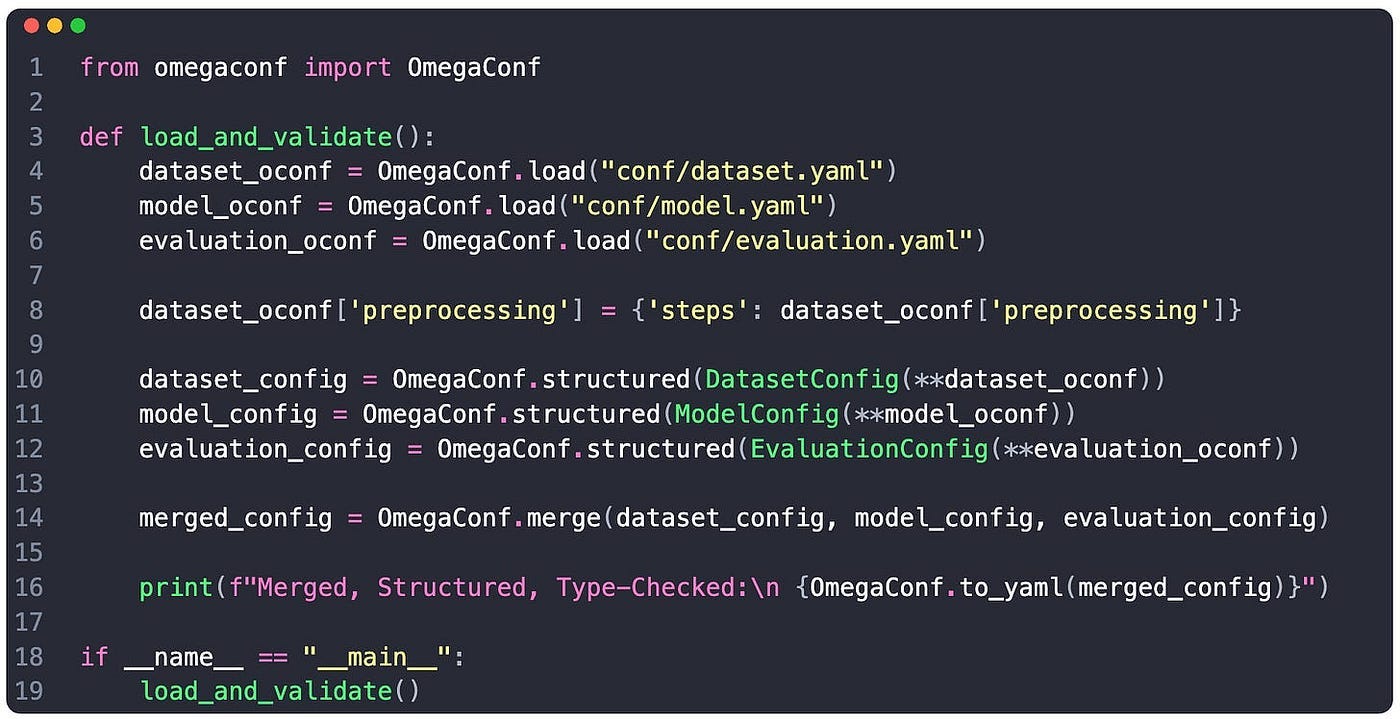
Type-checking is one of the main priorities when working with complex configurations highly required for ML in:
Hyperparameter Tuning
Model Architecture, and Layer Arguments
Data Processing steps and stages
End-to-end workflows for traceability
However, there’s a caveat in our implementation - more specifically, we should ask ourselves:
What happens if I have 10+ or 20+ config versions? Do I need to load and merge them manually?
The answer is: NO - Hydra is specifically designed for that.
3. What is Hydra?
Hydra builds on top of OmegaConf, creating a full-featured framework for configuration management in complex applications. Initially created by Facebook Research (FAIR), Hydra is particularly well-suited for ML workflows, as it offers:
Configuration Groups: To organize related configurations. For example, you might have groups for model, optimizer, and dataset, each with multiple options.
Command-Line Overrides: Allows for runtime configuration values to override from the CLI. For example python train.py model=resnet optimizer.lr=0.01.
Multirun Support: Has built-in support for running multiple configurations (like hyperparameter sweeps) without writing additional code.
Working Directory Management: Hydra automatically creates unique output directories for each run, organizing outputs by configuration.
4. Leveraging config runtime flexibility with Hydra
Following the same example as with OmegaConf, let’s now leverage Hydra.
Install Hydra
# pip
pip install hydra-core

# uv
(init from above) + uv add hydra-core
Using the same project structure and configs as above
├── my_awesome_llm/
├── conf/
|   ├── config.yaml
│   ├── dataset.yaml
│   ├── model.yaml
│   └── evaluation.yaml
├── playground.py
Defining a default config.yaml to group our sub-configs
# config.yaml
defaults:
  - dataset: dataset.yaml
  - model: model.yaml
  - evaluation: evaluation.yaml
Using Hydra to load our nested config
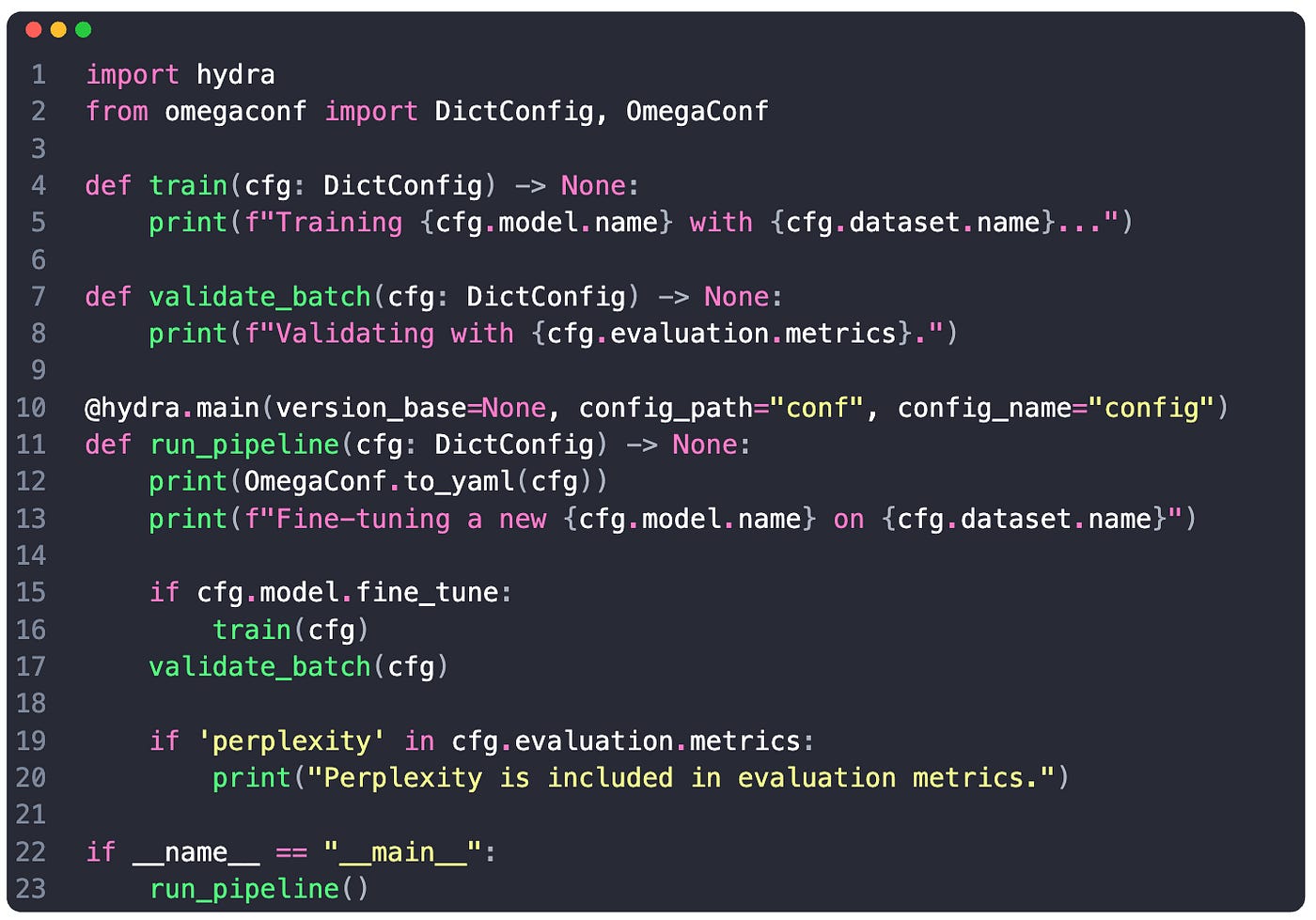
We use the hydra.main() decorator where we specify the folder to our config files under config_path argument.
Under config_name we pass in the name of our hydra config group config.yaml
When executing the decorated method run_pipeline - hydra automatically loads and serializes our config.
We can access the fields, (e.g. cfg.model.task, or cfg.dataset.split)
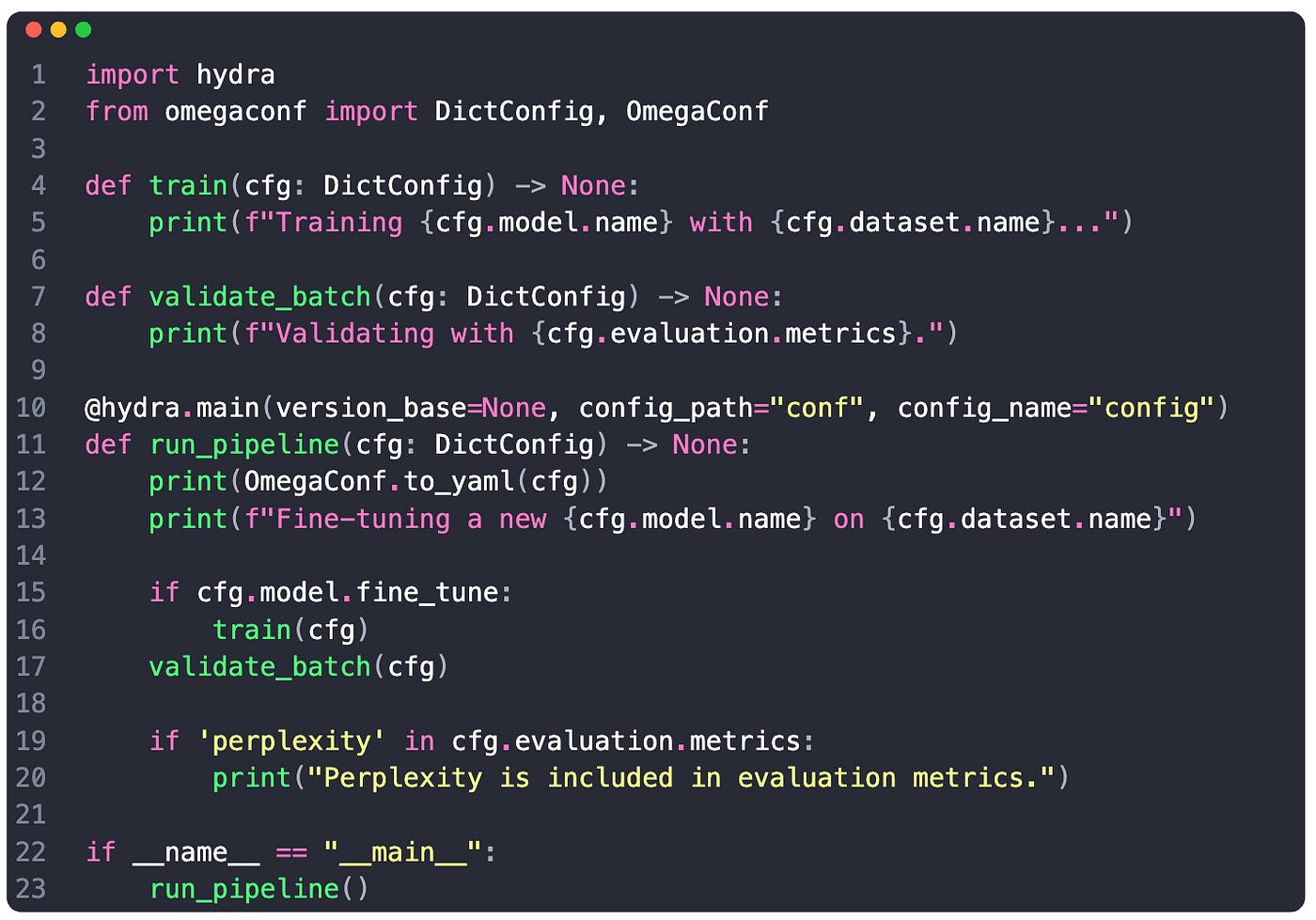
If we want more control over when to load our configuration, instead of the hydra.main() decorator we can use hydra.initialize and hydra.compose. Here’s how:
import hydra
from omegaconf import DictConfig

...
def run_pipeline():
    with hydra.initialize(config_path="conf):
        cfg = hydra.compose(config_name="config")

    print(cfg.model.fine_tune)
    # stdout: True

if __name__ == "__main__":
    run_pipeline()
5. Additional Tricks and Practices
Modifying fields at runtime - assuming we have fine_tune=True and split=’val’ we can run a job and modify these at runtime. Hydra will take care of generating log files with metadata of the original config and changed fields.
python train.py model.fine_tune=False dataset.split='train'Running sweeps using hydra multi-run - will spawn multiple Python processes, each taking care of a sweep configuration. For example, let’s use 3 different datasets for training, and start a multi-run:
python train.py -m dataset.name=v1.0,dataset_v1.5,filter_v1.0The output will look like this (exemplification):
[2024-03-20 11:54:18,655][HYDRA] Launching 3 jobs locally
[2024-03-20 11:54:18,655][HYDRA] #0 : dataset.name=v1.0
Training meta-llama/Llama-3.3-8b with custom_v1.0
Validating with ['fluency']

[2024-03-20 11:54:18,693][HYDRA] #1 : dataset.name=dataset_v1.5
Training meta-llama/Llama-3.3-8b with dataset_v1.5
Validating with ['diversity']

[2024-03-20 11:54:18,745][HYDRA] #2 : dataset.name=filter_v1.0
Training meta-llama/Llama-3.3-8b with filter_v1.0
Validating with ['diversity', 'fluency']
Conclusion
After reading this article, you’ve learned what the OmegaConf and Hydra duo can do and their advantages in managing ML project configurations. These two add-ons for structuring your config files on your ML workflows should make a notable difference when your project grows in complexity.
They’re straightforward to integrate into low-mid size ML projects, and they help clear-up the boilerplate around configuration, field validations, and managing/versioning different runs, which are quite common in ML projects.
Thanks for reading, see you in the next one!