
Building a Local AI Task Manager with PydanticAI and Ollama
A practical introduction to agent-based architectures using typed models, tools, and runtime context in Pydantic AI.

Welcome to The AI Merge. Where you learn practical, production-ready AI/ML Engineering. Join over 9000+ engineers and build real-world AI Systems.
In MAVS (Multi-Agent Vision System), my upcoming course, a part of the architecture is an A2A agent network. The agents coordinate on tasks, decide what needs to happen next, and split execution across the system.
While building that layer, I looked at a few frameworks: CrewAI, Google ADK, PydanticAI, and LangGraph. LangGraph was the first candidate and a strong fit for complex agent systems, giving you a lot of control over how agents move through a workflow. But I felt there were already a ton of examples on building LG Agents, and I wanted to try something new.
I ended up choosing PydanticAI.
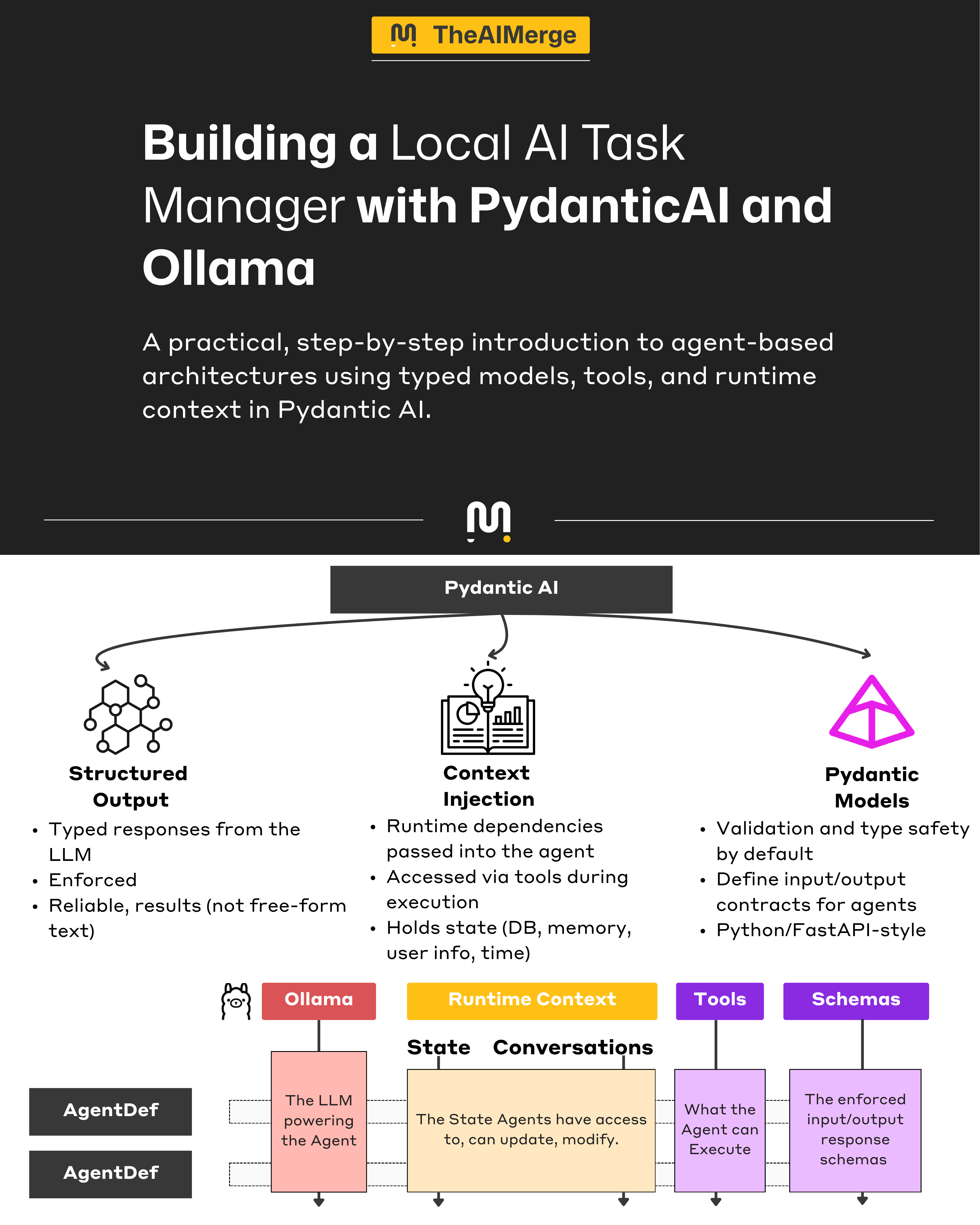
It is not as flexible or as mature as LangGraph, but it felt much closer to the way I already build Python applications. If you know Pydantic or FastAPI, the dev experience is similar: typed models, explicit structure, clear tool definitions, and code that is easy to follow.
PydanticAI does have real limits. In my experience, wiring native agent tools can feel rigid, and the flow control is more manual than it should be, but it’s still a good fit.
As an exercise to get familiar with the course’s tech stack, I decided to write a series of articles with quick end-to-end examples of actual tools and frameworks I’ve used in the course.
In this article, we will start with a small agent-powered app, a Task Manager that runs local models through Ollama and uses PydanticAI for the agent layer. The AI handles intent such as adding a task, marking work complete, or listing overdue items.
I will break the app down piece by piece and show how the PydanticAI concepts map to a real application architecture.
Table of Contents
The LLM Engine
Project Scaffolding
Defining Agent Schemas
Agents Runtime Context
Defining the Task & Report Agents
Adding Tools
The Agent Execution Flow
Demo
Please use the navigation bar on the left to go through the article sections.
Step 1 - The LLM Engine
We’ll use Ollama to run the local LLMs powering our Pydantic AI Agents. Ollama is one of the most popular solutions for running LLMs locally. It’s straightforward and super easy to set up.
tl;dr Ollama is built in Go, as an optimized serving layer on top of actual LLM models running in llama.cpp. You can consider Ollama as a wrapper over llama.cpp, which abstracts the setup complexity of a llama.cpp server.
For a complete guide on how Ollama works, see this article.
For the context of this article, however, we can simply install and use Ollama following these 3 steps:
Step 1.1 - Install Ollama on your Machine
curl -fsSL https://ollama.com/install.sh | shStep 1.2 - Start the Ollama Server
ollama serveStep 1.3 - Pull Qwen3:4B from Ollama Registry
ollama pull qwen3:4bStep 2 - Project Scaffolding
At this step, we need to set up a new Python project, install the required dependencies upfront, and prepare the project structure before starting to implement the components one by one.
For that, we’ll use astral/uv, a fast Python Project & Dependency manager built in Rust, that’s a drop-in replacement for other package managers (e.g., Conda, Poetry, requirements.txt).
If you’re working with Python and still use requirements.txt/poetry/conda to manage your dependencies, I strongly recommend porting to UV.
Step 2.0 - Install Uv
curl -LsSf https://astral.sh/uv/install.sh | shStep 2.1 - Creating a new Project
uv init --package pyai-starterStep 2.2 - Installing the Dependencies
uv add pydantic httpx pydantic-aiStep 2.3 - Activating the Environment
cd pyai-starter && source .venv/bin/activateStep 3 - Defining Agent Schemas
Before reaching the LLMs & Agents part, we start with the contract schema that will keep the AI layer grounded.
In our application, the schema does more than validate the data as it defines the domain. Once we have a clear Task model, every tool and agent can operate against the same data contract.
In doing that, we make our Agent work towards typed data structures that our application already understands.
Step 3.1 - Data Contracts for a Task
The following models will help us define the state of a Task, and will help the Agent understand how to map and interpret what a Task is.
Task - the core Pydantic Model with typed fields (id, title, status, priority, etc.)
TaskStatus - a string enum with Pending | InProgress | Cancelled | Completed.
TaskPriority - a string enum with Low | Medium | High | Urgent
class TaskStatus(str, Enum):
    """Task completion status."""
    PENDING = "pending"
    IN_PROGRESS = "in_progress"
    COMPLETED = "completed"
    CANCELLED = "cancelled"


class TaskPriority(str, Enum):
    """Task priority levels."""
    LOW = "low"
    MEDIUM = "medium"
    HIGH = "high"
    URGENT = "urgent"


class Task(BaseModel):
    """
    Domain model for a task.
    """
    id: int = Field(description="Unique task identifier")
    title: str = Field(description="Short description of what needs to be done")
    status: TaskStatus = Field(default=TaskStatus.PENDING, description="Current task status")
    priority: TaskPriority = Field(default=TaskPriority.MEDIUM, description="Task priority level")
    due_date: date | None = Field(default=None, description="Optional deadline (YYYY-MM-DD)")
    notes: str | None = Field(default=None, description="Additional details about the task")
    tags: list[str] = Field(default_factory=list, description="A label assigned to the Task")
    created_at: datetime = Field(default_factory=datetime.now, description="When the task was created")
When defining BaseModels for the Agent to use when serializing structured output, one useful tip is to always populate description fields, as it introduces additional context for the agent, making it understand how to manage/populate a field on output.
Although in low measure, keep in mind that these still have an impact on model’s context window. It may not be obvious on short turns, but on long enough conversations, every token counts.
Step 3.2 - The Results Object
Here, we’ll define two additional Pydantic Models to describe a TaskReport for getting overview details on all tasks, and a ReportNarrative for a summary across multiple tasks. Both of these Pydantic models will help the LLM format its responses in structured output.
TaskReport - the structured result returned by the Task Agent.
ReportNarrative - the structured status report across multiple tasks.
class TaskReport(BaseModel):
    """Structured summary report of task status."""
    total_tasks: int = Field(description="Total number of tasks")
    pending_count: int = Field(description="Tasks not yet started")
    in_progress_count: int = Field(description="Tasks currently being worked on")
    completed_count: int = Field(description="Tasks that are done")
    urgent_pending: list[str] = Field(description="Titles of urgent tasks not yet completed")
    summary: str = Field(description="Brief 1-2 sentence status summary")
    recommendation: str = Field(description="One clear next action for the user")


class ReportNarrative(BaseModel):
    """LLM-authored narrative grounded in provided task stats."""
    summary: str = Field(description="Brief 1-2 sentence status summary based only on provided stats")
    recommendation: str = Field(description="One clear next action based only on provided stats")
Step 4 - Agents Runtime Context
Agents will need to have access to the runtime state created or modified during a session. This runtime state shouldn’t live in a prompt directly, but be invoked on demand.
The runtime context is the extra data we pass into an agent at run time that is not part of the prompt or output schema. That is still accessible to tools, validators, and logic while the agent runs.
One example that helps with this idea is how Coding Agents work. During a session, the internal state is modified multiple times (list_directory, create_file, delete_file).
The Agent will be aware of these actions, and will mention them in its history - but won’t keep the log loaded in its prompt context, as it might get it confused.
All these dynamic actions are passed between Agent steps as a runtime state, a log that the Agent could interrogate to see what has been modified during its execution.
In PydanticAI, we can define a custom object that contains sub-objects we want to track in state, and then use dependency injection to make it available to the Agent’s runtime context.
Step 4.1 - Defining the TaskRepository
This is our in-memory task storage, with CRUD operations to enable actions that’ll modify the state.
We’ll have actions such as:
Create - adding a new task to the repository.
Get - fetching a task by ID.
ListAll - lists all tasks in the repository.
ListByStatus - filter tasks given a state.
ListPending - filter tasks in the Pending state.
Search - to search by title.
GetStats - to aggregate and display a report.
class TaskRepository:
    def __init__(self):
        self._tasks: dict[int, Task] = {}
        self._next_id: int = 1

    def create(self, title: str, priority: TaskPriority = TaskPriority.MEDIUM,
               due_date: date | None = None, notes: str | None = None,
               tags: list[str] | None = None) -> Task:
        task = Task(
            id=self._next_id,
            title=title,
            priority=priority,
            due_date=due_date,
            notes=notes,
            tags=tags or [],
        )
        self._tasks[task.id] = task
        self._next_id += 1
        return task

    def get(self, task_id: int) -> Task | None:
        return self._tasks.get(task_id)

    def list_all(self) -> list[Task]:
        priority_order = {TaskPriority.URGENT: 0, TaskPriority.HIGH: 1,
                         TaskPriority.MEDIUM: 2, TaskPriority.LOW: 3}
        return sorted(
            self._tasks.values(),
            key=lambda t: (priority_order[t.priority], t.created_at)
        )

    def list_by_status(self, status: TaskStatus) -> list[Task]:
        return [t for t in self.list_all() if t.status == status]

    def update_status(self, task_id: int, status: TaskStatus) -> Task | None:
        task = self._tasks.get(task_id)
        if task:
            task.status = status
        return task

    def delete(self, task_id: int) -> bool:
        if task_id in self._tasks:
            del self._tasks[task_id]
            return True
        return False

    def search(self, query: str) -> list[Task]:
        query_lower = query.lower()
        return [t for t in self.list_all() if query_lower in t.title.lower()]

    def get_stats(self) -> dict:
        all_tasks = self.list_all()
        return {
            "total": len(all_tasks),
            "pending": sum(1 for t in all_tasks if t.status == TaskStatus.PENDING),
            "in_progress": sum(1 for t in all_tasks if t.status == TaskStatus.IN_PROGRESS),
            "completed": sum(1 for t in all_tasks if t.status == TaskStatus.COMPLETED),
            "urgent_pending": [t.title for t in all_tasks
                              if t.priority == TaskPriority.URGENT
                              and t.status not in (TaskStatus.COMPLETED, TaskStatus.CANCELLED)],
        }
Step 4.2 - Defining the TaskDeps
With TaskDeps, we’ll keep track of the runtime dependencies we want to pass to our Agent via dependency injection. This can be a simple dataclass, where we instantiate:
TaskRepository - such that the Agent would have access to add/modify/delete entire tasks or their states, and have the baseline to generate a report.
@dataclass
class TaskDeps:
    """
    Runtime dependencies for the task agent. Injected into Agent's runtime context.
    """
    task_repo: TaskRepository
We’re using dataclass and not BaseModel, since dependencies are for runtime injection, not really used by the Agent for output schema generation.
Step 5 - Defining the Task & Report Agents
At this step, since we’ve already defined the Runtime State for our Agents and the Pydantic Base models for structured Inputs/Outputs, we need to create the actual Agents.
For that, we’ll have to do two things:
Create an OpenAI API Compatible Connection
Compose the Agents
Step 5.1 - The BuildModel Function
Since we’re using Ollama to serve LLMs, and it being OpenAI API compatible, the setup becomes as simple as specifying the Model Provider, and then during the Pydantic AI Agent instantiation, we’ll wire up the model tag and provider URL.
OLLAMA_URL = "http://localhost:11434/v1"
MODEL_NAME = "qwen3:4b"

def build_model() -> OpenAIChatModel:
    return OpenAIChatModel(
        model_name=MODEL_NAME,
        provider=OpenAIProvider(
            base_url=OLLAMA_URL
        ),
    )
Step 5.1 - The Task Agent
The anatomy of any PydanticAI Agent is composed of:
Model - here we pass the
OpenAIModelcreated above.DepsType - the runtime state model TaskDeps we’ve defined above.
Retries - a safeguard to tell the model how many times it can retry a failed run, such as failing to serialize the correct Pydantic model.
SystemPrompt - the base instructions for the Agent.
task_agent = Agent[TaskDeps, str](
    model=build_model(),
    deps_type=TaskDeps,
    retries=2,
    system_prompt="""You are a task management assistant. You help users manage their to-do list. You should be concise and to the point, answers should be fast.

Your capabilities:
- Create new tasks with title, priority, due date, and notes
- List tasks (all, pending, or by status)
- Mark tasks as in-progress, completed, or cancelled
- Search tasks by keyword
- Get the current time in any timezone

Guidelines:
- Use the appropriate priority level based on user language (urgent, high, medium, low)
- Format task lists clearly with status indicators

Available tools will let you perform these operations on the user's task list.""",
)
Step 5.1 - The Report Agent
Same as the above, only changing the base instructions in the SystemPrompt.
report_agent = Agent[TaskDeps, ReportNarrative](
    model=build_model(),
    deps_type=TaskDeps,
    output_type=ReportNarrative,
    retries=1,
    system_prompt="""You write short task status narratives from provided repository stats.

Rules:
- Use only the numbers and task titles provided in the prompt.
- Do not invent tasks, counts, percentages, or priorities.
- Keep the summary to 1-2 sentences.
- Give exactly one actionable recommendation.
- If there are no tasks, say so plainly.
""",
)
Notice that, when defining an Agent, we’ve used square brackets (Template Style) to specify the I/O schemas the Agent should consider when parsing/composing responses.
For the TaskAgent [TaskDeps, str]- we’re passing TaskDeps as input, and expect plain str as output. That’s because this is our main Agent entry point, and we’ll chat with it.
For the ReportAgent [TaskDeps, ReportNarrative]- we’ve used TaskDeps as input, such that the Agent can access our TaskRepository, but passed the ReportNarrative model as output. That means the ReportAgent will always try to serialize its output following the ReportNarrative Pydantic model we have.
Step 6 - Adding Tools
At this stage, our Agents will hallucinate. They understand the schemas and what they can/should do - but don’t yet have the means to accomplish that. That’s why we need to define a set of tools to enable our Agents to manipulate and work with Tasks in our TaskRepository.
In PydanticAI, we can define two types of tools using decorators:
Plain Tools (@agent.tool_plain) - for when the Agent doesn’t need to know about its runtime context. For example, telling the current time.
Tools (@agent.tool) - for when the Agent has a dependency on the runtime context. For example, moving a Task from the Pending state to the completed state implies access to the TaskRepository from the runtime context.
Step 6.1 - Adding tools to the Task Agent
We’ll add a set of 6 different tools:
GetCurrentTime - plain text tool to get the current timestamp, without accessing the full Context.
CreateTask - used to add a new task to our in-memory TaskRepository
ListTasks - used to list all tasks in the TaskRepository
UpdateTaskStatus - used to move any Task between states.
SearchTasks - used to search by title.
DeleteTask - used to remove a task from the Repository.
@task_agent.tool_plain
async def get_current_time(timezone: str = "UTC") -> str:
    """
    Get the current date and time in a specific timezone.

    Use this when the user asks about the time, or when you need
    to determine "today" or "tomorrow" for due dates.

    Args:
        timezone: IANA timezone name (e.g., "America/New_York", "Europe/London", "Asia/Tokyo")

    Returns:
        Current date and time as a formatted string
    """
    try:
        tz = ZoneInfo(timezone)
        now = datetime.now(tz)
        return f"Current time in {timezone}: {now.strftime('%Y-%m-%d %H:%M:%S %Z')} (weekday: {now.strftime('%A')})"
    except Exception:
        return f"Unknown timezone '{timezone}'. Use IANA names like 'America/New_York', 'Europe/London', 'Asia/Tokyo'."

@task_agent.tool
async def create_task(
    ctx: RunContext[TaskDeps],
    title: str,
    priority: Literal["low", "medium", "high", "urgent"] = "medium",
    notes: str | None = None,
) -> str:
    """
    Create a new task. Today's date is provided in the response for reference.

    Args:
        title: What needs to be done
        priority: low, medium, high, or urgent
        notes: Optional details
    """
    today = date.today()
    task = ctx.deps.task_repo.create(
        title=title,
        priority=TaskPriority(priority),
        due_date=today,
        notes=notes,
        tags=[],
    )

    due_str = f", due {task.due_date}" if task.due_date else ""
    return f"Created task #{task.id}: '{task.title}' [{task.priority.value}]{due_str}. (Today is {today})"


@task_agent.tool
async def list_tasks(
    ctx: RunContext[TaskDeps],
    filter_status: Literal["all", "pending", "in_progress", "completed"] = "pending",
) -> str:
    """
    List tasks from the to-do list.

    Use this when the user asks to see their tasks, to-do list, or what needs to be done.

    Args:
        filter_status: Which tasks to show
            - "pending": tasks not started (default, most useful)
            - "in_progress": tasks being worked on
            - "completed": finished tasks
            - "all": everything

    Returns:
        Formatted list of tasks with status, priority, and due dates
    """
    if filter_status == "all":
        tasks = ctx.deps.task_repo.list_all()
    elif filter_status == "pending":
        tasks = ctx.deps.task_repo.list_by_status(TaskStatus.PENDING)
    elif filter_status == "in_progress":
        tasks = ctx.deps.task_repo.list_by_status(TaskStatus.IN_PROGRESS)
    else:
        tasks = ctx.deps.task_repo.list_by_status(TaskStatus.COMPLETED)

    if not tasks:
        if filter_status == "pending":
            return "No pending tasks. You're all caught up!"
        return f"No {filter_status} tasks found."

    status_icons = {
        TaskStatus.PENDING: "○",
        TaskStatus.IN_PROGRESS: "◐",
        TaskStatus.COMPLETED: "✓",
        TaskStatus.CANCELLED: "✗",
    }

    lines = []
    for t in tasks:
        icon = status_icons.get(t.status, "?")
        due = f" (due: {t.due_date})" if t.due_date else ""
        lines.append(f"{icon} #{t.id}: {t.title} [{t.priority.value}]{due}")

    return "\n".join(lines)


@task_agent.tool
async def update_task_status(
    ctx: RunContext[TaskDeps],
    task_id: int,
    new_status: Literal["pending", "in_progress", "completed", "cancelled"],
) -> str:
    """
    Update a task's status.

    Use this when the user wants to:
    - Start working on a task → "in_progress"
    - Mark a task as done/finished → "completed"
    - Cancel or remove a task → "cancelled"
    - Reset a task → "pending"

    Args:
        task_id: The task number (e.g., 1, 2, 3)
        new_status: The new status to set

    Returns:
        Confirmation message or error if task not found
    """
    task = ctx.deps.task_repo.update_status(task_id, TaskStatus(new_status))
    if task:
        return f"Task #{task.id} '{task.title}' is now {task.status.value}."
    return f"Task #{task_id} not found. Use list_tasks to see available tasks."


@task_agent.tool
async def search_tasks(ctx: RunContext[TaskDeps], query: str) -> str:
    """
    Search tasks by keyword in the title.

    Use this when the user wants to find a specific task or tasks
    related to a topic.

    Args:
        query: Search term to look for in task titles

    Returns:
        List of matching tasks or message if none found
    """
    tasks = ctx.deps.task_repo.search(query)
    if not tasks:
        return f"No tasks found matching '{query}'."

    lines = [f"Found {len(tasks)} task(s) matching '{query}':"]
    status_icons = {
        TaskStatus.PENDING: "○",
        TaskStatus.IN_PROGRESS: "◐",
        TaskStatus.COMPLETED: "✓",
        TaskStatus.CANCELLED: "✗",
    }
    for t in tasks:
        status = status_icons.get(t.status, "?")
        lines.append(f"  {status} #{t.id}: {t.title} [{t.priority.value}]")
    return "\n".join(lines)


@task_agent.tool
async def delete_task(ctx: RunContext[TaskDeps], task_id: int) -> str:
    """
    Permanently delete a task.
    Use this only when the user explicitly wants to remove a task entirely.
    """
    if ctx.deps.task_repo.delete(task_id):
        return f"Task #{task_id} has been deleted."
    return f"Task #{task_id} not found."
After adding tools, we can make an important and interesting distinction.
This is strikingly similar to how MCPs standardize tool access for LLMs. In any Agent framework, using an “agent.tool” decorator will register the Python method for the Agent’s execution context, as a callable function.
Similarly, when using MCP, the state is kept inside the MCP server, instead of the Agent’s runtime context. Both approaches provide schema-defined functions that an LLM can choose to invoke, making their interfaces conceptually similar, only that MCP is gated by a protocol boundary, with agents sending function names and attributes via JSON-RPC.
Find more details on how MCPs work, in this MCP is Just A Fancy API article.
Step 6.2 - Adding helpers for the Report Agent
The scope for this sub-agent is narrow, that is, taking the current TaskRepository state and generating a summary report. Usually, here we’d use an intent classifier (small classifier LLM) to figure out from the user’s message if it should do a task report or not.
We’ll be doing that manually, using hardcoded key terms.
The Report Agent will use these two helpers:
IsReportRequest - figure out if the Report agent should be invoked.
def is_report_request(user_input: str) -> bool:
    normalized = user_input.strip().lower()
    report_terms = (
        "report",
        "summary",
        "summarize",
        "status",
        "overview",
        "stats",
        "statistics",
    )
    return any(term in normalized for term in report_terms)
DumpTasksForReport - a simple serializer method that takes the TaskRepository state and extracts it as plain text.
def dump_tasks_for_report(task_repo: TaskRepository) -> str:
    tasks = task_repo.list_all()
    if not tasks:
        return "Current task repository: no tasks."

    lines = ["Current task repository:"]
    for task in tasks:
        due = task.due_date.isoformat() if task.due_date else "none"
        notes = task.notes or "none"
        tags = ", ".join(task.tags) if task.tags else "none"
        lines.append(
            f"- id={task.id}; title={task.title}; status={task.status.value}; "
            f"priority={task.priority.value}; due_date={due}; tags={tags}; notes={notes}"
        )
    return "\n".join(lines)
We could have added this serialization to the TaskRepository BaseModel directly, or use the built-in .model_dump_json(). To separate boundaries between Agents, we’ll serialize outside the Pydantic model.
Step 7 - The Execution Flow
At this point, we’ve already defined the core building blocks of the app: the task schema, runtime dependency object, model setup, agent definitions, and the tools the main agent can call.
The last step is wiring everything into an execution flow through a simple Gradio chat interface, where:
The main task_agent handles task operations with streaming
The report_agent handles report-style requests
The UI decides which path to invoke
Gradio is an open-source Python library used to rapidly create customizable, shareable web-based user interfaces (UIs) for AI/ML usecases.
For that, customized to our project example, we’ll need 2 methods:
GenerateReport - executed whenever the ReportAgent is invoked.
CreateUIApp - this is where we wire together the Agent loop, UI components, and workflows.
Step 7.1 - Add the GenerateReport Function
Instead of computing a separate stats object and converting it into a report model, we now pass the current repository state directly to the report agent.
  def dump_tasks_for_report(task_repo: TaskRepository) -> str:
      tasks = task_repo.list_all()
      if not tasks:
          return "Current task repository: no tasks."

      lines = ["Current task repository:"]
      for task in tasks:
          due = task.due_date.isoformat() if task.due_date else "none"
          notes = task.notes or "none"
          tags = ", ".join(task.tags) if task.tags else "none"
          lines.append(
              f"- id={task.id}; title={task.title}; status={task.status.value}; "
              f"priority={task.priority.value}; due_date={due}; tags={tags}; notes={notes}"
          )
      return "\n".join(lines)
What this does:
reads the current in-memory tasks from TaskRepository
converts them into a compact plain-text dump
gives the report_agent the exact repository contents as prompt context
avoids extra report-only helpers and schemas
Step 7.2 - Step by Step Gradio UI (With Token Streaming)
The main UI is still built inside create_ui_app(). This is where we store app state, define the async chat handler, and connect it to Gradio components.
RunStream (run_stream) - this is where Pydantic AI executes the agent loop.
async with task_agent.run_stream(
    user_input,
    deps=state["deps"],
    message_history=state["history"],
    usage_limits=UsageLimits(request_limit=10),
) as stream:
What happens inside this context manager:
The agent sends the user input + message history to the LLM
The LLM decides whether to respond directly or call a tool
If a tool is called, the agent executes it and loops back to the LLM
This continues until the LLM produces a final text response
The run_stream method gives us access to this process as it happens, rather than waiting for the entire loop to complete.
Streaming Text Tokens to the UI - we iterate over text chunks as they arrive from the LLM.
async for message in stream.stream_text(delta=True):
    streamed_text += message

    display = ""
    if tool_calls_shown:
        display = "\n".join(tool_calls_shown) + "\n\n"
    display += streamed_text

    updated_history = history + [{"role": "assistant", "content": display}]
    yield "", updated_history
What’s happening:
stream.stream_text(delta=True) yields incremental text tokens (e.g., “I”, “’ve”, “ added”, “ the”, “ task”)
We accumulate these into streamed_text
Each iteration, we yield the updated history to Gradio
Gradio receives the yield and immediately updates the chatbot UI
The user sees tokens appear one by one, creating a “typing” effect
Why delta=True? Without it, each iteration would return the full text so far. With delta=True, we get only the new characters, which we accumulate ourselves.
Extracting Tool Calls After Completion - we get the tool_calls from the message history, to show what the Agent did.
state["history"] = stream.all_messages()

for msg in state["history"]:
    if hasattr(msg, 'parts'):
        for part in msg.parts:
            if isinstance(part, ToolCallPart):
                tool_str = f"🔧 `{part.tool_name}({part.args})`"
                if tool_str not in tool_calls_shown:
                    tool_calls_shown.append(tool_str)

final_display = ""
if tool_calls_shown:
    final_display = "\n".join(tool_calls_shown) + "\n\n"
final_display += stream.response.text or ""
What’s happening:
stream.all_messages()returns the complete conversation history, including tool calls and responsesWe iterate through messages looking for
ToolCallPartobjectsWe prepend these to the final display so users can see what tools were invoked.
Report Requests - figuring out if the agent should generate a task report.
if is_report_request(user_input):
    try:
        result = await report_agent.run(
            f"{user_input}\n\n{dump_tasks_for_report(state['deps'].task_repo)}",
            deps=state["deps"],
            usage_limits=UsageLimits(request_limit=2),
        )
        response = result.output if isinstance(result.output, str) else str(result.output)
    except Exception as e:
        response = f"Error generating report: {e}"
    history = history + [{"role": "assistant", "content": response}]
    yield "", history
    return
What’s happening:
is_report_request(...) detects report-like prompts such as “report” or “summary”
We dump the current repository into text
We append that dump to the report prompt
report_agent.run(...) returns a plain text report
The response is added to chat history and shown in the UI
The UI Wiring (Gradio) - where we define the UI Gradio blocks.
with gr.Blocks(title="Task List Agent") as app:
    chatbot = gr.Chatbot(height=450, type="messages")
    msg = gr.Textbox(placeholder="Add a task...", label="Message")
    clear = gr.Button("Clear All")

    msg.submit(chat_stream, [msg, chatbot], [msg, chatbot])
    clear.click(clear_all, outputs=[chatbot, msg])
What’s happening:
gr.Chatbot(type=”messages”)expects the new dict format:{”role”: “user/assistant”, “content”: “...”}msg.submit()connects the textbox to our chat_stream generatorBecause
chat_streamuses yield, Gradio automatically streams updates to the chatbot
Step 7.3 - Full UI Code
def create_ui_app():
    import gradio as gr
    from pydantic_ai.messages import ToolCallPart

    # Shared state
    state = {"deps": TaskDeps(task_repo=TaskRepository()), "history": []}

    async def chat_stream(user_input: str, history: list):
        if not user_input.strip():
            yield "", history
            return

        history = history + [{"role": "user", "content": user_input}]
        yield "", history

        if is_report_request(user_input):
            try:
                result = await report_agent.run(
                    f"{user_input}\n\n{dump_tasks_for_report(state['deps'].task_repo)}",
                    deps=state["deps"],
                    usage_limits=UsageLimits(request_limit=2),
                )
                response = result.output if isinstance(result.output, str) else str(result.output)
            except Exception as e:
                response = f"Error generating report: {e}"
            history = history + [{"role": "assistant", "content": response}]
            yield "", history
            return

        tool_calls_shown = []
        streamed_text = ""

        try:
            async with task_agent.run_stream(
                user_input,
                deps=state["deps"],
                message_history=state["history"],
                usage_limits=UsageLimits(request_limit=3),  # Limit LLM calls for speed
            ) as stream:
                async for message in stream.stream_text(delta=True):
                    streamed_text += message

                    display = ""
                    if tool_calls_shown:
                        display = "\n".join(tool_calls_shown) + "\n\n"
                    display += streamed_text

                    updated_history = history + [{"role": "assistant", "content": display}]
                    yield "", updated_history

                state["history"] = stream.all_messages()

                for msg in state["history"]:
                    if hasattr(msg, 'parts'):
                        for part in msg.parts:
                            if isinstance(part, ToolCallPart):
                                tool_str = f"🔧 `{part.tool_name}({part.args})`"
                                if tool_str not in tool_calls_shown:
                                    tool_calls_shown.append(tool_str)

                final_display = ""
                if tool_calls_shown:
                    final_display = "\n".join(tool_calls_shown) + "\n\n"
                final_display += stream.response.text or ""

                history = history + [{"role": "assistant", "content": final_display}]
                yield "", history

        except Exception as e:
            history = history + [{"role": "assistant", "content": f"Error: {e}"}]
            yield "", history

    def clear_all():
        state["deps"] = TaskDeps(task_repo=TaskRepository())
        state["history"] = []
        return [], ""

    with gr.Blocks(title="Task List Agent") as app:
        gr.Markdown("# PydanticAI Task List Agent\nManage tasks with AI. Type `report` for a summary.")

        chatbot = gr.Chatbot(height=450)
        msg = gr.Textbox(placeholder="Add a task, list tasks, mark done...", label="Message")

        with gr.Row():
            clear = gr.Button("🗑️ Clear All")
            gr.Examples(
                examples=["Add a high priority task: Review PR", "List my tasks", "Mark task 1 as done", "report"],
                inputs=msg,
            )

        msg.submit(chat_stream, [msg, chatbot], [msg, chatbot])
        clear.click(clear_all, outputs=[chatbot, msg])

    return app
Step 7.4 - Gradio Entrypoint
Here we’ll wire the main entry point, set the server name, and the port on which the Gradio app will start.
if __name__ == "__main__":
    app = create_ui_app()
    app.launch(server_name="0.0.0.0", server_port=7860, share=False)
Then, since we’ve activated the Python virtual environment at Step 2.3, we can run our app using python main.py.
Step 8 - Project Demo
Conclusion
In this article, we’ve built a fully working local AI application: a task manager powered by PydanticAI, running on a local Ollama model, and surfaced through a simple Gradio interface.
In practice, most AI engineers won’t stick to a single framework forever. Some will use LangGraph, others CrewAI, Mastra, ADK, and others will build their own loops in plain Python.
If you’re coming from a Python/FastAPI background, using PydanticAI should feel natural. It’s the same BaseModels, Pydantic Validations, typed data, and explicit structures.
In the context of the upcoming MAVS course, this is a small step into understanding the tech stack, frameworks, and tools used to build it, and acts as a short intro on the key concepts before diving into the full end-to-end system building.
The framework doesn’t matter as much as the architecture.
Hope you enjoyed this article!
Images and Media were created by the author, if not otherwise stated.
References
[1] Pydantic AI. (2024). Pydantic.dev. https://ai.pydantic.dev/
[2] Team, G. (2020). Gradio. Gradio.app. https://www.gradio.app/
[3] Ollama. (2026). Ollama. https://ollama.com/
[4] The AI Merge. (2025, October 25). The Complete Guide to Ollama: Local LLM Inference Made Simple (VIDEO). Theaimerge.com; The AI Merge. https://read.theaimerge.com/p/the-complete-guide-to-ollama-local
Wow, really cool. Loved that you used Ollama!